
Gazing
WebFront Innovations LimitedTools
3.6337.00 Reviews
- Version
- 2.2.6
- Installs
- 10.00K
- Age Rating
- Everyone
Screenshots
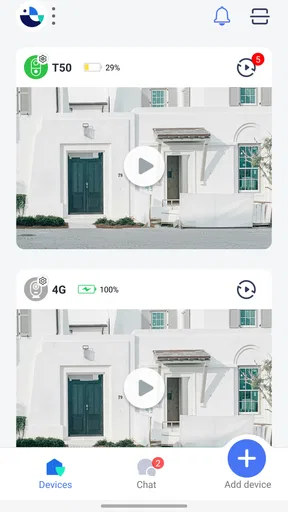
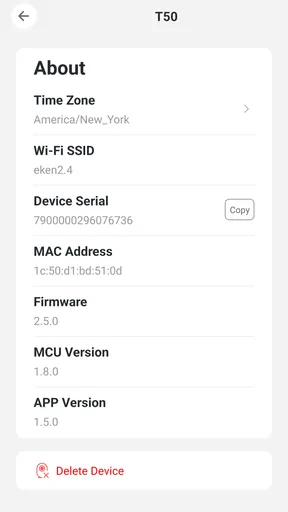
Our Review of Gazing
 Analysis by Appyee
Gazing is a visitor-communication tool, not a mindfulness or meditation app. Its purpose is practical: it lets you talk with visitors and see them through your smartphone. That makes it worth considering if you want a phone-based way to handle someone at your door, but it also means the right choice depends on your existing setup and how much you need to do remotely.
Start with the decision that matters
Before installing it, I’d first ask what problem I’m trying to solve. If I want to identify a visitor and speak to them without immediately going to the entrance, Gazing is aimed at that sort of interaction. If I only need a chime inside the home, or I’m looking for a broader home-security system, an ordinary doorbell or a dedicated security product may be a better match.
The app is in the tools category and is made by WebFront Innovations Limited. It is free to download, though in-app purchases are listed from $19.99 to $169.99 per item, so I would check the purchase options carefully before committing to any paid extras. Its audience rating is Everyone, and it has a 3.9 average from around 310 ratings, with over 10,000 installs. That gives a quick sense of its current reach, but neither popularity nor a rating can tell you whether it will work with the visitor setup you have in mind.
Where a phone-based visitor tool can help
The main appeal is the combination of seeing and talking to a visitor on a smartphone. That can be useful when I’m in another room, occupied with a task, or not ready to open the door. For example, if a delivery arrives while I’m on a work call, being able to respond from my phone could help me handle the interruption without abandoning the conversation. The practical value is not simply having another app; it is having a way to deal with a doorstep interaction while away from the entrance.
There is also a useful distinction between answering a visitor and granting access. I would treat the app as a communication option, not as a reason to let someone in automatically. A quick conversation can help me understand why a person is there, but I would still make the access decision myself and follow the same caution I would use at the door. That small habit keeps convenience from turning into an avoidable security risk.
Compare it with the alternatives you already use
Compared with a basic doorbell, Gazing is relevant when speaking through a phone matters, rather than simply hearing that somebody has arrived. Compared with a standalone camera, its stated focus includes conversation as well as seeing a visitor. But people who need a complete security system, a local-only setup, or a particular integration should compare products specifically against those requirements instead of assuming this app covers them.
One non-obvious trade-off is that a smartphone-based interaction depends on your phone being available at the right moment. If it is out of reach, muted, or already demanding your attention, the app may not make a visitor any easier to handle than your existing doorbell. I’d think about where I usually keep my phone and whether I can notice an incoming interaction during a normal day before relying on it as my main way to answer the door.
Check the fit before paying or changing routines
Gazing is listed at version 2.1.3 and requires Android 6.0 or later. I would check that the phone I plan to use meets that requirement, then make sure the app suits the device or visitor equipment I intend to pair it with. Compatibility is the key practical question here: downloading a visitor app alone does not guarantee that it can communicate with every doorbell, camera, or entry system.
If you are considering a purchase, decide what you need before choosing an in-app option. A sensible approach is to identify the single everyday situation you want to improve, then assess whether Gazing supports that setup before spending. The listed price range is broad enough that I would not treat the free download as proof that every useful capability is included at no cost. Keep the phone and any related equipment in mind as part of the decision, rather than judging the app in isolation.
I’d be less inclined to recommend it to someone who is happy with a simple chime, does not want visitor conversations on a phone, or needs a carefully specified security and privacy arrangement. Those are not minor preferences: they determine whether a phone-based visitor workflow is convenient or an unnecessary extra step. If you live with other people, it is also worth agreeing who should answer and how to respond, so the app does not create confusion when more than one person receives a visitor notification.
Using it in an ordinary day
Imagine I’m working at home with my phone nearby and someone arrives while I’m finishing a task. A phone-based view and conversation could let me find out who is there and respond before deciding whether to pause and go to the entrance. If I’m expecting a delivery, I can make that judgement with less guesswork; if I’m not expecting anyone, I can keep the interaction brief and decide what to do next. That is a concrete benefit, but it relies on the phone being reachable and the connected setup being ready.
Small checks that make the experience more dependable
I would test the complete visitor flow at a quiet time rather than waiting until an important delivery or unexpected arrival. Confirm that the intended phone can receive and handle an interaction, and try the process from the place where you normally spend time at home. This simple rehearsal can reveal practical friction—such as keeping the phone elsewhere or not noticing it—before you begin depending on the app.
It is also sensible to decide how the app fits into your household routine. If someone else usually answers the door, agree whether they should continue doing so or whether the phone will be the first point of contact. For a shared home, clear expectations matter more than adding another notification channel. And if the phone is unavailable, keep a familiar backup, such as answering in person or using your existing doorbell routine.
What to expect from the switch
Moving from a conventional doorbell to a smartphone-based workflow is a change in habit, not just an installation. You may need to remember to keep the phone accessible and learn when it is useful to answer remotely rather than walk to the door. The benefit is most convincing for people who regularly cannot reach the entrance quickly or want to speak before deciding what to do. If you are almost always beside the door when visitors arrive, the extra phone step may add little.
Gazing is free to install, but the available in-app purchases make it worth checking the costs and what each option provides before relying on a particular paid capability. I would approach the decision in stages: verify the setup you intend to use, try the basic workflow, and only then decide whether spending makes sense. That avoids paying for an assumed benefit and gives you a clearer basis for comparing it with a simpler doorbell or another visitor-management option.
My recommendation
Gazing is worth a look if your priority is handling visitor conversations and seeing who is at the entrance from a smartphone. Its value will be strongest when your phone is normally close by and the setup you want to use is compatible. I would not choose it solely because a phone interface sounds modern, nor would I treat it as a replacement for every security feature someone might want from a broader system.
If you prefer a straightforward chime, need a specific security arrangement, or do not want doorstep interactions routed through your phone, another option may fit better. For someone who wants a more flexible way to respond to visitors while occupied elsewhere at home, though, Gazing offers a clear use case. I’d try it with a realistic everyday routine in mind, check the purchase choices, and keep a familiar backup until I know the phone-based approach works comfortably for my household.
First Impressions
When I first launched Gazing, I was immediately struck by its clean and minimalist design. The interface is super intuitive, which is a big win in my book. You don’t want to be fumbling around trying to figure out how to use an app that’s supposed to help you relax! Everything is right where you’d expect it to be, making navigation a breeze.
Features That Stand Out
One of the coolest features of Gazing is its personalized meditation sessions. You start by answering a few questions about your current state of mind and what you’re hoping to achieve through meditation. Based on your answers, the app tailors sessions specifically for you. It’s like having a meditation guru in your pocket!
The app also offers a wide variety of meditation techniques. From guided meditations and breathing exercises to visualization and soundscapes, there’s something for everyone. I particularly enjoyed the soundscapes, which transport you to serene environments without having to leave your room. It’s like a mini-vacation for your mind.
Ease of Use
Gazing is designed for users of all levels, and it shows. The app provides detailed instructions for each meditation session, so you’re never left wondering what to do next. There’s also a helpful FAQ section for any questions that might pop up along the way. Trust me, even if you’re a complete newbie to meditation, you’ll feel right at home.
Another neat feature is the reminder system. You can set up notifications to nudge you towards taking a few minutes for yourself each day. It’s a gentle reminder that self-care is important, and I found it incredibly helpful in keeping me on track.
Community and Support
What sets Gazing apart from many other meditation apps is its vibrant community. Users can connect with each other, share experiences, and even participate in group meditation sessions. It’s a fantastic way to stay motivated and feel like you’re part of something bigger. Plus, the support team is responsive and always ready to help with any issues.
Final Thoughts
Overall, I’m genuinely impressed with what Gazing has to offer. It’s not just another meditation app; it’s a comprehensive tool that caters to both beginners and seasoned meditators alike. The personalized sessions, variety of techniques, and supportive community make it a standout choice in the crowded space of mindfulness apps.
If you’re looking to enhance your meditation practice or simply want to dip your toes into the world of mindfulness, I’d definitely recommend giving Gazing a try. It’s available for download on both Android and iOS, so you can start your journey towards peace and tranquility today.
Verdict
Strengths of Gazing
- Intuitive user interface, easy to navigate.
- Wide range of customization options.
- Seamless integration with calendar apps.
- Real-time notifications for updates.
- Supports multiple platforms for syncing.
Limitations of Gazing
- Limited free features, premium needed.
- Occasional bugs with older devices.
- High battery consumption on mobile.
- Some features require internet connection.
- Limited offline functionality.
Similar Picks in This Category
View All
Google LLC4.0

Gboard - the Google Keyboard
Google LLC4.5

Google Play services
Google LLC4.3

Google Play Store
Google LLC4.9

Files by Google
Google LLC4.5

SHAREit: Transfer, Share Files
Smart Media4U Technology Pte.Ltd.4.3
Frequently Asked Questions
What is Gazing and what are its main features?
Gazing is an innovative app designed to help users track and enhance their productivity through mindfulness and focus exercises. The app offers features like personalized meditation sessions, focus timers, and progress tracking. It also integrates with your calendar to provide reminders and insights into your daily routines, making it a comprehensive tool for personal development.
Is Gazing available for both Android and iOS devices?
Yes, Gazing is available for both Android and iOS platforms. Users can download the app from Google Play Store for Android devices and the Apple App Store for iOS devices. It is designed to provide a seamless experience across different devices, ensuring accessibility and convenience for all users.
Does Gazing offer a free version, and what are the premium features?
Gazing offers a free version that includes basic mindfulness exercises and focus timers. For users seeking advanced features, the premium subscription provides access to a broader range of meditation sessions, personalized coaching, and detailed progress analytics. Premium users also enjoy an ad-free experience and early access to new features.
How does Gazing ensure user privacy and data security?
Gazing prioritizes user privacy by implementing robust security measures, including data encryption and secure login protocols. The app complies with GDPR and CCPA regulations, ensuring that users' personal information is handled with care. Users can review the privacy policy for detailed information on data handling practices.
Can Gazing be integrated with other productivity tools?
Yes, Gazing can be integrated with several productivity tools, such as Google Calendar, Trello, and Slack. These integrations allow users to synchronize their schedules, set reminders, and receive notifications seamlessly. This feature enhances the app's functionality, making it a versatile tool for boosting productivity.
